• I haven’t posted in a while because I’ve been testing out some new apps! I already use Cashwalk, WeWard, and Evidation, but I wanted to branch out a little and see if any other walking/step counting apps are decent side-earners. I started this new batch on August 13th, 2025. Spoiler: some of these are worth keeping, and some… not so much.


    Cash Steps
    This one was a flop. You “earn” by hitting a certain step count each day for a chance at $1 (odds go up the more you walk). You can also watch ads to boost your odds.
    After a whole month, the only dollar I earned was the sign-up bonus. That’s it.

    Verdict: Not worth your time.


    PaidtoGo
    A little better, but still underwhelming. You earn coins based on your daily steps, and you need 1,000 coins to cash out. After a month, I earned 160 coins, which works out to maybe $20/year at my pace.
    There’s a subscription option to earn more coins, but since I’m trying to save money, I’m not paying to make money. On the plus side, you don’t have to log in every day and there aren’t many ads.

    Verdict: Better than Cash Steps, but still not impressive.


    Winwalk
    Now we’re getting somewhere. Winwalk gives you coins for your steps, with the option to watch one ad per day to collect all your coins at once. There are also missions and achievements for bonus coins.

    In my first month, I earned 2,151 coins (and I didn’t even log in every day). Payout is $10 for 16,000 coins, which means I’d get about a cashout and a half per year at my current pace. Lots of gift card options too, which I like.

    Verdict: Worth keeping and testing longer. I’ll hang on to it at least until I cash out once.
    Referral link (we both get 300 coins): Winwalk

    Steps Money
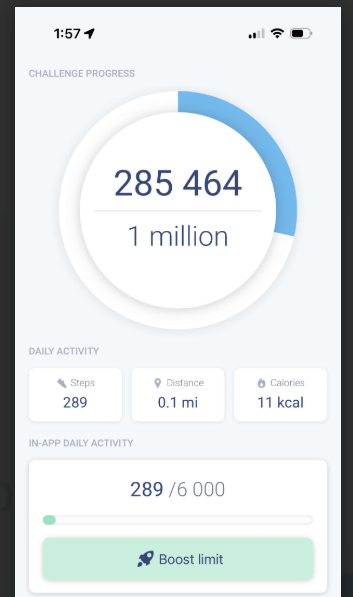
    This one is very ad-heavy, but the payout is faster than most. You earn straight cash: $10 once you hit 1 million steps. (Still not sure if it goes to PayPal or bank, I’ll update once I find out!)

    By default, you get 5,000 steps a day, but you can watch ads every 1,000 steps up to 10,000. There are also extra ads for +5,500 steps daily and sometimes +750 steps on login.

    In one month, I logged 285,444 steps, which works out to about 4–5 months for a $10 cashout. Not amazing, but better than the others this round.

    Verdict: Decent, as long as you don’t mind the ads.


    Charity Miles
    Charity Miles doesn’t pay you — it raises money for charities through sponsors. When you sign up, you choose a sponsor category and a charity. Mine are Ucan (a fitness brand I’d never heard of) and World Central Kitchen.

    The app tracks your steps, walks/runs, and bike rides, then allocates donations from a fixed sponsor pool. It doesn’t show you the dollar amount raised, which I wish it did, but I like the idea. It’s like doing a mini charity walk every day.

    Verdict: Great if you want to give back, but not for personal earnings.


    Ranking These Apps (Worst to Best for Personal Earnings)

    • Cash Steps – Worst: Don’t waste your time.
    • PaidtoGo: Slightly better, but too slow.
    • Winwalk: Steady earning, gift cards, worth keeping.
    • Steps Money – Best: Most promising payout speed, even with heavy ads.

    Compared to My Regulars

    • Cashwalk – Still my #1. Reliable, steady payouts, and easy to use. (My code is US5WP if you want 500 coins to get started.)
    • WeWard – Slow but fun. I like the extras (like trading cards) even if it takes a while to cash out.
    • Evidation – The OG. I keep it around for the health info and surveys. The payout is tiny, but it’s low-maintenance.

    Compared to these, I’ll probably keep Steps Money and Winwalk running in the background, but drop Cash Steps and PaidtoGo.


    Walking apps won’t pay my debt off anytime soon, but they’re a fun little way to squeeze extra dollars (or donations). I walk a lot at work already, right? If you’ve tried any of these, or know of one I haven’t covered yet, I’d love to hear about it!

    – Laurel 🍂
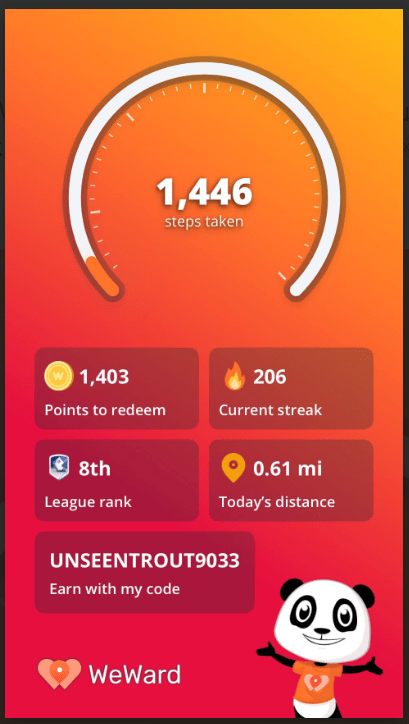
  • I’ve officially been using WeWard for over 200 days (currently at a streak of 206!) and I’ve found it to be a solid little side-earner. I currently have enough points to cash out $10 to PayPal, but I’m holding out until I reach $25. There are also various gift card options available if that’s more your style.

    Most points come from your step count, but I also make sure to watch the four ads every morning for a chance at bonus “Wards” (the app’s points). You can also earn extra Wards by playing games or completing daily/weekly challenges.

    One feature I enjoy is WeCards, which appear on the app’s map as you walk. Collecting these cards adds them to your in-app album, and completing an album rewards you with even more cards. You can also trade or gift cards to friends on the app, which makes it a fun bonus while you’re out walking.

    There’s a Premium Warder level that unlocks slightly higher earnings, but I haven’t focused on that yet. For now, I stick to my daily routine, averaging about 9,000 steps, and stacking my WeWard earnings with another walking app, Cashwalk, for a little extra. Once I’m done with my round of games on Swagbucks I’ll work on earning Premium Warder.

    Overall, I’d say WeWard is pretty decent. It’s not a lot of money, but it’s an easy way to earn something while doing what I already do—walk.

    If you want to give it a try, you can sign up using my referral code (we can trade cards!):

    UnseenTrout9033

    And if you know of any other walking apps that actually pay, I’d love to hear about them!

    – Laurel 🍀

  • July was the first month I really focused on earning with money-making apps. I made $30.46 total, and I’m starting to learn what works and what’s worth skipping.

    Here’s the full breakdown of what I earned and some early thoughts on where to focus next.


    My July Earnings Breakdown

    • Google Rewards – $5.05
      Quick surveys, easy payouts to PayPal. It’s passive but slow.
    • Ibotta – $20.41
      This one really showed up this month — combining bonuses, item rebates, and a little planning before grocery trips.
    • Cashwalk – $5.00
      Cashed out for a gift card. It’s simple but slow, I always earn $5 a month just from how many steps I take at work.

    Total: $30.46


    What I Learned This Month

    The app that paid me the most for July was Ibotta, which required the most set up. I had to plan my trips to purchase the items that would get cashback while also resisting the temptation to buy items I don’t need just to get cashback.

    My favorite apps, Google Rewards and Cashwalk are slow but consistent. I get pay outs from them every month.

    This month I learned that I need to strike a balance between:

    • Apps I rely on for cash (like Ibotta)
    • Apps I’m testing for blog content (even if they pay less or not yet)

    I want to try new things, but I also need to earn money. My roof is not going to fix itself.


    My Plans for August

    Keep Ibotta as a core app — it pays out. I just need to be careful to buy only what I actually need. Even if I get cashback I’m not actually saving money if I’m buying things I don’t need. Stocking up is different.

    I need to pick out a new app for testing and review.

    Creating a simple tracker to monitor what pays and how fast for both personal use and to share with my readers.


    Final Thoughts

    I know $30 isn’t huge, but that’s $30 I didn’t have before. And I’m learning fast. If you’re also trying to earn a little side cash without being overwhelmed, I’ll keep sharing what’s worth your time.

    – Laurel 🪻

  • I use a lot of receipt apps to get money back from everyday shopping trips. We’re on a tight budget right now to replace a leaking roof, so every little bit helps. I’m sharing my exact scan routine and the apps I use, so you can start getting extra money back too.


    Step 1: My Receipt Stash

    I don’t stash receipts — I scan them immediately. Some apps have time limits on how old a receipt can be, so I lay them out and run through my whole routine as soon as I get home.

    I try not to wrinkle receipts so they scan better. Sometimes they live neatly folded in my shopping bag or pocket. A few creases are fine — they’re easier to flatten than a crumpled wad.


    Step 2: Check Ibotta and Fetch deals

    Ibotta works best if you select deals before shopping. I try to plan this while making my grocery list, so I know I’ll get money back on what I’m buying. If I forget, I’ll check after — sometimes I still catch a deal, but prepping first is better.

    Fetch is similar — I check bonus offers ahead of time when I can.


    Step 3: How I Scan Them

    Here’s my exact scan order:
    1️⃣ Google Rewards — it takes a while to upload.
    2️⃣ Fetch — always first for base points + bonuses.
    3️⃣ Ibotta — add the cash back.
    4️⃣ Box Tops — if I’m scanning anyway, I help a local school.
    5️⃣ Receipt Hog — coins and spins.
    6️⃣ ReceiptPal — easy points.
    7️⃣ Frisbee — same receipt, more points.
    8️⃣ Receipt Jar — takes a bit longer but worth it.
    9️⃣ Coin Out — quick snap, no offers. I do this last because they have a daily reward if you’re in the app for 60 seconds — so I wrap up my whole routine here.

    I’m also testing Copper and Shopkick. Copper seems promising; Shopkick feels like a weaker version of Ibotta so far. I’ll post reviews once I have more experience!


    Step 3: Little Tips to Save Time

    • Scan immediately — no forgetting, no expired receipts.
    • Flatten extra-crumpled receipts; take multiple photos if the app allows it.
    • Long receipts? Snap in sections if needed.
    • Toss receipts after scanning (or file big purchases like electronics for warranty).

    Why It’s Worth It

    You won’t get rich scanning receipts, but it adds up. So far this year I’ve gotten back $230 from these little apps. It’s a tiny habit that stacks up each month, and a lot of apps boost your earning as you level up.


    If you only want to use one app I think Fetch is a good choice. It’s easy to use, offers a flat rate for every receipt you scan, has bonuses for certain items (most apps don’t do this), and if you’re into it you can earn points by playing games.

    I’ve posted reviews for some of these apps already like Coin Out and Receipt Jar, so check those out if you’re curious. I’ll share more reviews for the rest of my stack soon, so keep an eye out!

    Do you stack your receipts too? Tell me your favorite combo — I’ll test any new app you love!

    – Laurel 🌿

  • I’m always looking for new receipt apps; some are duds, but some quietly pay off over time. Receipt Jar didn’t wow me at first, but it’s grown on me enough that I’ve cashed out $10 and I’m close to my next $5. Here’s why it might work for you too.


    What is Receipt Jar?

    An app where you snap receipts, get points, then cash out for PayPal or gift cards.

    The interface has a lot going on (tabs, buttons, pop-ups) but once you get the hang of it, it’s simple enough to use.


    Key features:

    📸 Snap a photo of your receipt — a bit buggy sometimes but works fine once it’s uploaded.

    🛒 Earn points based on how much you spend (up to 20 points for $100+ receipts).

    🔵🫙 Blue Jar: Weekly bonus: if you scan at least 1 approved receipt a week, you fill the Blue Jar for extra points.

    🟡🫙Golden Jar: The more receipts you scan, the higher your level and the more your monthly Golden Jar is worth.

    📊 Expense tracker — a nice bonus if you like seeing where your money goes.


    I’ve cashed out $10 to PayPal so far, and I’m almost at my next $5.
    Honestly, I didn’t love the interface at first — lots of buttons and tabs everywhere — but it’s grown on me. If you want one receipt app (or just a few), it works well.

    Scanning can glitch sometimes (Fetch is still easier) and I almost always forget that the Golden Jar is clickable — don’t miss those bonus points!


    Is It Worth It?

    👍 Good if you don’t want 6 receipt apps cluttering your phone.

    👍 Good if you like seeing your spending in one spot.

    👍 Nice passive bonuses if you scan consistently.

    👎 Not as instant/simple as Fetch; the scanning can take an extra step.


    Receipt Jar probably won’t replace Fetch for me, but it’s earned a spot in my routine. If you’re picky about apps, or just want something that quietly stacks points without much work, it’s worth a try.

    – Laurel 🌺

  • Coin Out Review: How I Turn Receipts Into Spare Change

    Every week, I gather receipts; grocery runs, gas, hardware store odds and ends, and take-out. Each day, I run them through every app I can. Coin Out is one of those apps I’ve kept around and here’s why.


    How It Works

    You snap a photo of your receipt. Coin Out pays you a set amount of points based on your rank. That’s it. No offers, no clipping coupons, just a quick photo and you’re done.


    Why I Keep Using It

    I like that it works with almost any paper receipt. I always scan Fetch first, then Coin Out for an extra penny or two. It’s not exciting, but it’s basically free change.

    Each receipt might generate a mission — a line on your receipt gets selected, and you scan that product’s barcode in the app. The biggest points come from short surveys about your shopping habits. Last month, I transferred $25 to my PayPal!


    What’s Not So Great

    Don’t expect big bucks. Some missions pick a line that’s just a store discount instead of an actual product you bought. Sometimes the app bugs out and you have to rescan. But honestly? It’s one of the least annoying cash-back apps I’ve tried.


    My Receipt Routine

    I stack Coin Out with Fetch, Receipt Hog, Frisbee, ReceiptJar, Copper, and ReceiptPal. One receipt — seven scans — done. It all goes in my roof fund jar at the end of the month, because every penny helps


    Should You Bother?

    If you’re already scanning receipts, there’s no reason not to add Coin Out. If you hate apps that make you clip offers, you’ll probably like it. Just don’t expect it to pay your bills, think spare change, not side income.

    Here’s a referral link if you’re interested: Coin Out


    Do you stack your receipts too? Got another app I should test out? Tell me — I’ll try it so you don’t waste your time.
    — Laurel 🌱

  • Evidation Review: The OG Health App That Pays You (A Little)

    Evidation (which used to be called Achievement) is one of the OG “get paid to walk” apps. I’ve used it for years and I still think it’s worth it.


    What Is Evidation?

    Evidation is one of the oldest health reward apps, launched back in 2012. It connects to your phone or fitness tracker and syncs with multiple health apps like MyFitnessPal and Apple Health.

    You earn points for daily steps, logging meals and sleep, answering short surveys, and sometimes joining medical studies.

    10,000 points = $10, paid via PayPal.


    How I Use It

    I connect my phone, my fitness tracker, and a few health apps. Every morning, I answer the daily Health Card questions, quick and easy. I log at least one meal in MyFitnessPal for extra points (some weeks I track more rigorously than others).

    I like the health insights the app gives me about my habits, and I always read the weekly health article too.


    Is Evidation Worth It?

    The payout won’t blow you away; these days I make about $10 a year. Not gonna lie, back when I first started using it, payouts were better and you could cash out faster.

    Still, I think it’s worth it:
    The daily Health Card takes about 30 seconds.
    Steps track automatically.
    There are no ads.

    I consider the money a nice little bonus, the real value is the habit tracking and insights. It’s free money for stuff you’re probably already doing anyway.


    If you’re looking for big bucks — skip it. If you want a simple, passive reward for staying a bit healthier — go for it.

    — Laurel 🌱

  • Skip These: 3 Money Apps That Wasted My Time

    I’m all about squeezing extra money out of small apps, but not every one is worth your time or effort. Here are three side hustle apps I personally tried and quit (or might retry)  and why they didn’t work for me.


    One Pulse

    A modern survey app that pays you small amounts for sharing your opinions through micro polls.

    It looks great, is easy to use, and has a really clean interface. I loved that the surveys (called “pulses”) are super short, some are just a single question, and the topics are fun. Sometimes they’re introspective, sometimes they’re about pop culture, animals, or seasonal stuff (hello pumpkin spice fans). It’s honestly refreshing for a survey app.

    The difference with One Pulse is that each pulse gives you experience points. When you level up, you qualify for paid surveys that pay a little more. You’ll get notified when a paid survey is available, usually on weekdays, but they close fast, so you have to be quick!

    I really wish One Pulse worked out for me. It has a lot going for it and feels different from other survey apps. But it just takes forever to reach cash out. After a whole year, I’m still sitting at $12 and you need $20 to withdraw. It’s also incredibly buggy.

    While I was checking my account for this post, I noticed they’ve added a new daily streak feature. So I might give it another shot and see if things have improved.

    Verdict: Maybe worth testing if you love short, interesting polls — but don’t expect fast cash.

    If you want to give it a whirl, here’s my referral code: AVETNJ


    Pogo

    Pogo is an app that pays you small cashback rewards for sharing your transaction data and receipts.

    My take? It’s not for me. You have to link your debit card or bank account for it to work. It’s part of the sign-up process and not optional. Personally, I’m trying to save money, and I don’t feel comfortable linking my card for a few extra bucks. The tiny payout just isn’t worth the potential financial risks, in my opinion.

    Verdict: If you don’t mind linking your card, it might be worth trying. But for me, it didn’t fit my money goals. I’d rather stick to receipt apps like Fetch, which don’t need full banking access.


    Sweatcoin

    A fitness app that rewards you with Sweatcoins for your steps; in theory, free money for walking.

    I walk a lot at my retail job, so stacking walking apps just like I do with receipt apps sounds perfect. Unfortunately, you can’t cash out Sweatcoins for real money or gift cards, you can only spend them in their marketplace and the marketplace wasn’t great. Rewards were limited or needed huge coin amounts. It felt like I was earning points I’d never really use.

    Fun if you want a little boost to walk more, but not great for real gift cards or cash.

    Verdict: Fun if you want a small boost to stay active, but not great for real gift cards or cash. If you want actual gift cards for your steps, I’d stick with Cashwalk instead.


    Not every app will help you pad your side cash, some just waste your time (or your data). I’ll keep testing so you don’t have to.

    Got an app you want me to try out? Let me know in the comments.

    Thanks for reading — Laurel 🪴

  • 3 Money Apps I Actually Use Every Week (No Hype, Just Cash)

    Hey, I’m Laurel.
    I work full-time in retail and I’m trying to pay off debt without picking up a second job — my schedule is way too unpredictable for that.

    These are three apps I actually use every week to make a little extra cash. They’re my favorites: tiny cash, no nonsense — but it all adds up.


    1️⃣ Google Opinion Rewards

    Google sends me short surveys. I answer in about 10 seconds and get paid through PayPal.

    You’ll need a Google account, and it works on both Android and iOS. Quick tip: for the best chance at surveys, keep your location turned on and allow the app to communicate with other apps — it uses that info to create surveys for you.

    One thing to know: Android and iOS differ slightly. On Android, you get Google Play credit. On iOS, you cash out with PayPal. Just make sure you’re using the same Gmail account or link the right email to PayPal.

    The surveys are short, open for about 12 hours, and cover random topics. Lately, I’ve even gotten surveys that ask for a quick receipt photo.

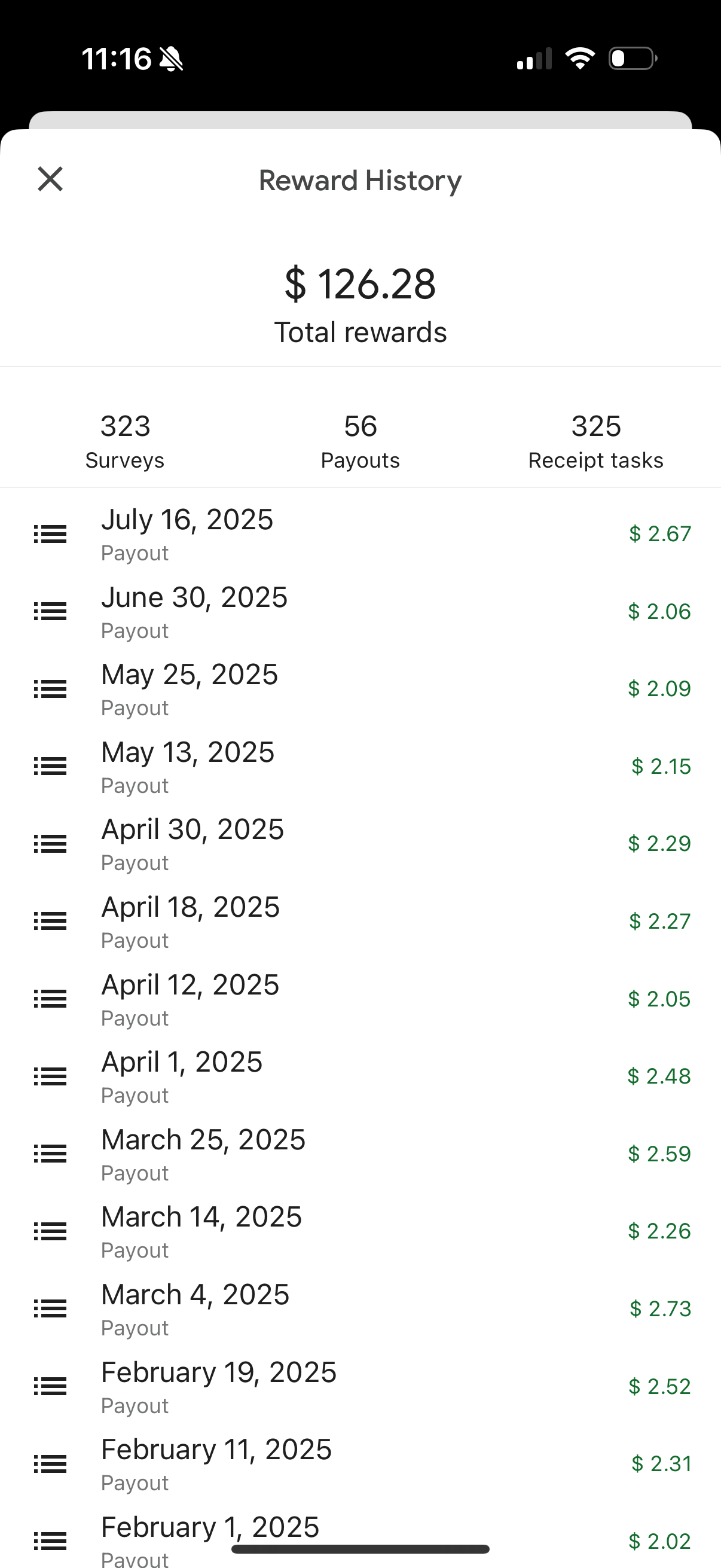
    Last month I made $2.06, and in May I got $4.24 — enough for a coffee I didn’t have to budget for.


    2️⃣ Fetch Rewards

    Fetch Rewards is one of the easiest receipt apps I’ve tried. I scan grocery and gas receipts, earn points, and trade those points for gift cards.

    The best part? You don’t have to pre-select any offers — just scan your receipt and it finds the points for you. You can also link your email, Walmart, Sam’s Club, or Amazon accounts for automatic receipt scanning.

    Each receipt is worth at least 25 points, so I scan everything. I also recommend checking which items qualify for bonus points — sometimes faded or really long receipts miss them, and you’ll need to add them manually.

    So far this year, I’ve earned about $10 in gift cards and I’m about to hit $50. I even played a game through Fetch once and scored enough points for an extra $13!

    If you want to try Fetch, here’s my referral code: DJD428 — we’ll both get 2,000 bonus points when you sign up!


    3️⃣ Cashwalk

    Cashwalk is a walking app that rewards you with gift cards just for moving — it’s my favorite walking app!

    You earn coins by filling up a wheel as you take steps. You also unlock ads after hitting certain step counts, the biggest one is at 6,000 steps, and those ads pay out extra coins. I’ve seen between 6–10,000 coins just from these daily ads.

    I walk a lot at work, I average about 10,000 steps a day, so this app basically runs in my pocket while I’m on the job. Every night before bed, I collect my coins from the wheel and watch the ads while winding down.

    I usually earn a $5 gift card every month, which adds up to about $60 a year. I use it for cleaning products for my house — one less thing to budget for.

    Want to give Cashwalk a try? Use my referral code US5WP when you sign up and you’ll get an extra 500 coins!


    Let’s be real: none of these apps are going to make you rich. There’s no magic app that pays a living wage. But I’d rather have an extra $60 than nothing at all.

    I’m going to keep testing apps like these (the good and the bad), so if you’re curious, stick around. I’ll always share what’s worth it — and what’s not.


    Want real side hustle tips that actually work?
    I test these apps and share what’s worth your time — and what’s not.
    Follow me on TikTok [@earnedwhilebusy] for quick updates and real results.


    Thanks for reading — and good luck earning while busy!

    – Laurel  🌿